

5 Tools to Discover Engaging Sermon Illustrations
Do you struggle to find engaging, interesting, and effective sermon illustrations to explain, illustrate, prove, and apply your sermon’s message? Let’s look at 5 excellent tools to discover exciting sermon illustrations that will serve as the meat on the bones of your sermon outline.
Our previous post in our 10-step sermon prep method talked about putting meat on the bones of a good, creative, and interesting sermon outline. Now let’s find the sources for that tasty meat. Finding the meat might make us feel like the old 1980s Wendy’s Commercials which asked, “Where’s the Beef?”
1984 Wendy’s Commercial - “Where’s the Beef?”
Content from Sermon Prep Research
The best source for illustration material comes from your research. As you ask the Interpretive Questions early in our 10-step process, you will find the answers in commentaries, word studies, and Bible dictionaries. Logos Bible Software offers many great tools to help you find this information.
Go to a passage, like our example from Proverbs 3:5-6, which we’ve used in this process. Logos lets you find information in several useful ways.
Factbook - Right-click on your passage and make sure the passage is selected from the Reference item in the list on the left side of the pop-up menu, and then choose Factbook. A Factbok report will show you Commentaries, examples of Questions to Ask the AI tools in Logos, entries from People, Places, and Things, plus Biblical Events. You’ll see media and Sermons. You can also click links to run one of the Guides (Passage Guide, Sermon Starter Guide, and Exegetical Guide).
Guides - If you don’t want to use the Factbook to get started searching for illustration material. you can run Guides on the passage. Select it and make sure the passage is selected in the left side list. Then click on on eof the Guides. On the right, you’ll see the option to open one of the following:
Passage Guide - searches books related to a passage, like commentaries, word study tools, and more.
Sermoin Starater Guide - opens and searches sermon tools.
Exegetical and Exegesis Guides - focus on word study and other grammar tools.
You can also look up words by selecting them in Logos and right-clicking. Make sure the Selection is set to a word in the left column of the pop-up in Logos that appears when you right-click a word. Below that, you’ll see several language study tools focused on the English, Greek, Hebrew, or Aramaic word selected. You can also run a Bible Word Study using the link in the right column of the pop-up. Other options include looking up the word in Wikipedia, using a Power Lookup, or using a Topic Guide. The Power Lookup shows the word in language tools, Bible translations (like a topical guide of the Bible), or Bible dictionaries.
Sermon Assistant - an AI Tool in Logos
Logos now comes with powerful Artificial Intelligence tools that don’t just search the Internet. Instead, they search your library for answers to your common language questions.
If you search using the Study Assistant, you can find a lot of information. Much of it can fit your illustration materials as the meat on your sermon’s bones.
I searched “How does one trust God with all your heart?” The Study Assistant returned several books with entries about the subject. These answers might inspire ideas for concrete, creative sermon illustrations that explain, illustrate, prove, and apply the idea.
AI Tools Outside Logos (ChatGPT or Gemini)
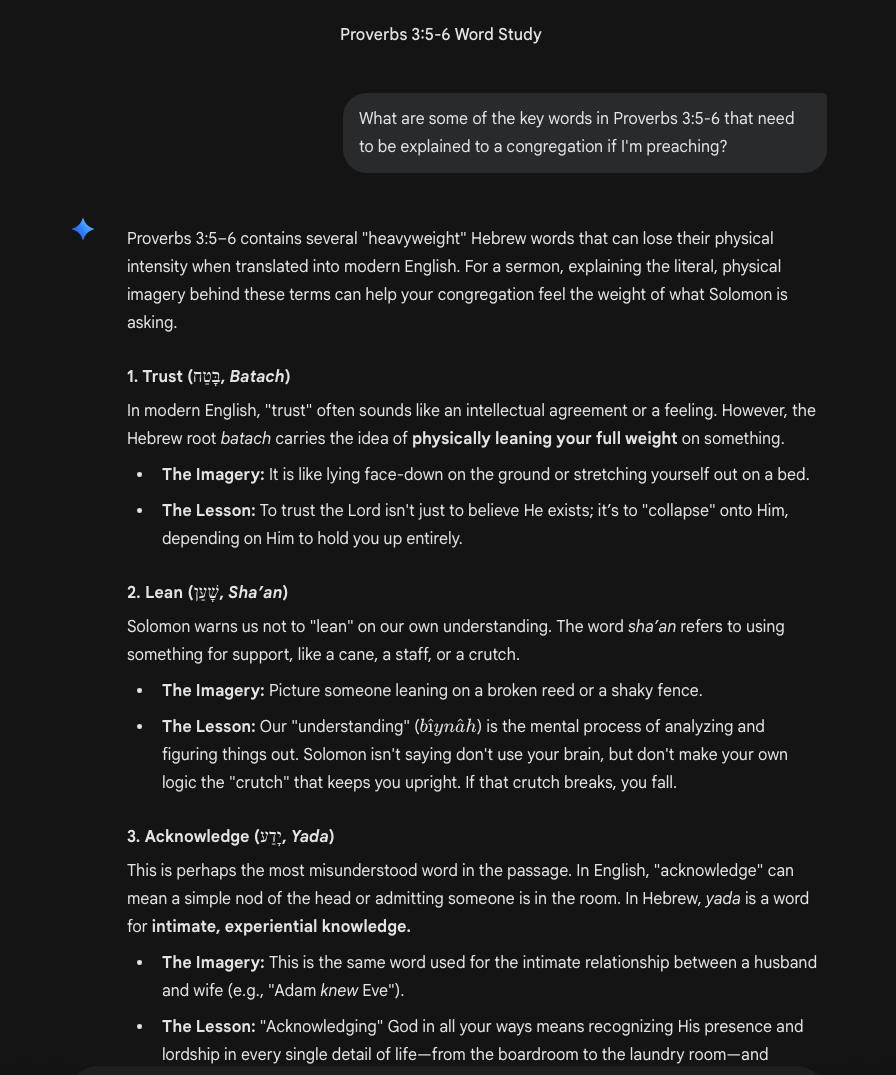
I asked Gemini to find the key words in Proverbs 3:5-6 and it gave me the words, the imagery behind the word, and lesson about the word.
Do not search your passage in an AI chatbot like ChatGPT and ask it to write a sermon. However, these AI Tools do a great job of finding illustration material. I entered the following prompt for Proverbs 3:5-6 in Gemini, Google’s AI Chatbot.
What are some of the key words in Proverbs 3:5-6 that need to be explained to a congregation if I'm preaching?
Gemini didn’t disappoint. It returned the following for the word Lean…
2. Lean (שָׁעַן, Sha’an)
Solomon warns us not to "lean" on our own understanding. The word sha’an refers to using something for support, like a cane, a staff, or a crutch.
The Imagery: Picture someone leaning on a broken reed or a shaky fence.
The Lesson: Our "understanding" is the mental process of analyzing and figuring things out. Solomon isn't saying don't use your brain, but don't make your own logic the "crutch" that keeps you upright. If that crutch breaks, you fall.
Next, I asked Gemini the following question:
Take the word "lean" and, using the imagery you offered, come up with 3 engaging illustrations of the idea that will appeal to a modern audience of Christians and non-believers alike.
The chatbot gave me three interesting illustrations about…
Someone is leaning on a glass crutch that might break.
A person trusting too much in the self-driving features of a modern car.
A power lifter is unable to lift weights but refuses the help of his spotter.
Of those three, I think the glass crutch offers the most interesting. I could even bring a walking stick with me that day and make sure it’s not strong enough to hold my weight. That adds a touch of creativity to the presentation.
Exploring Natural Analogies Exercise
We found several “Natural Analogies” using Gemini, which gave us three good illustrations to explain the concept of leaning on your own understanding from Proverbs 3:5-6. Even if you don’t want to use an online AI Chatbot, you could find natural analogies using the following exercise from Wayne McDill’s book The 12 Essential Skills for Great Preaching (affiliate link).
Write down the idea you’ll illustrate, and if it’s a theological term, try to write it as a non-theological concept.
Brainstorm areas of life and experience where you’ve seen that concept demonstrated and write them down in a brief phrase or sentence.
If you get stuck and can’t think of any life experiences, think about your roles as a person (father, husband, teacher, son, citizen, athlete, artist, friend - anything that fits). Don’t forget to also think about people in the congregation and the roles they fulfill.
Prayerfully read your list and ask the Holy Spirit to guide you to one or a few that your congregation will understand (they’ve experienced it) and you can describe (you’ve experienced it or seen it in others’ experience).
Write out a story or experience chosen in step 4 as if you were telling someone about it that didn’t already know about your experience. Find the right tone (humorous, somber, descriptive).
Judge how your written story fits in the sermon. If it’s too long, it can overshadow the Biblical message. If it’s too short, it might lack a concrete description that people can relate to.
Make sure it doesn’t embarrass anyone except yourself and fit it into the sermon outline.
Search for Images Related to the Concept
Once you come up with your concept from the passage, go to image search sites and enter the word or phrase. See what comes back. You can search…

I used Gemini to create the above image, which shows the idea of Trust and leaning on something. The old man is carrying a cane. I started with the following prompt:
Create an image that demonstrates the idea of trust based on Proverbs 3:5-6 and show the word Trust prominantly on the image. Make it 1920x1080 for display in a presentation.
That didn’t work, so I tweaked it, and it still didn’t work. Finally, I gave it the following prompt, which created the image above.
That doesn't really illustrate the concept of trust. Make it something like an old man leaning on a rubber cane.
Right now, Gemini, with its “Nano Banana” image-creation engine, seems to deliver the best results. You can also use ChatGPT or, if you use Canva, open it and create not only an image but also a full slide to use in your sermon presentation. If you can provide your nonprofit status, Canva is free.